AI Travel Manager Web App
A client/server application based on a Node.js + Express API paired with a React + Vite UI for a Travel Product management application featuring AI-powered search and product generation.
La documentation de ce projet n'est disponible qu'en anglais.
- React
- Node.js
- Express
- PostgreSQL
- Prisma
- Tailwind CSS
- OpenAI
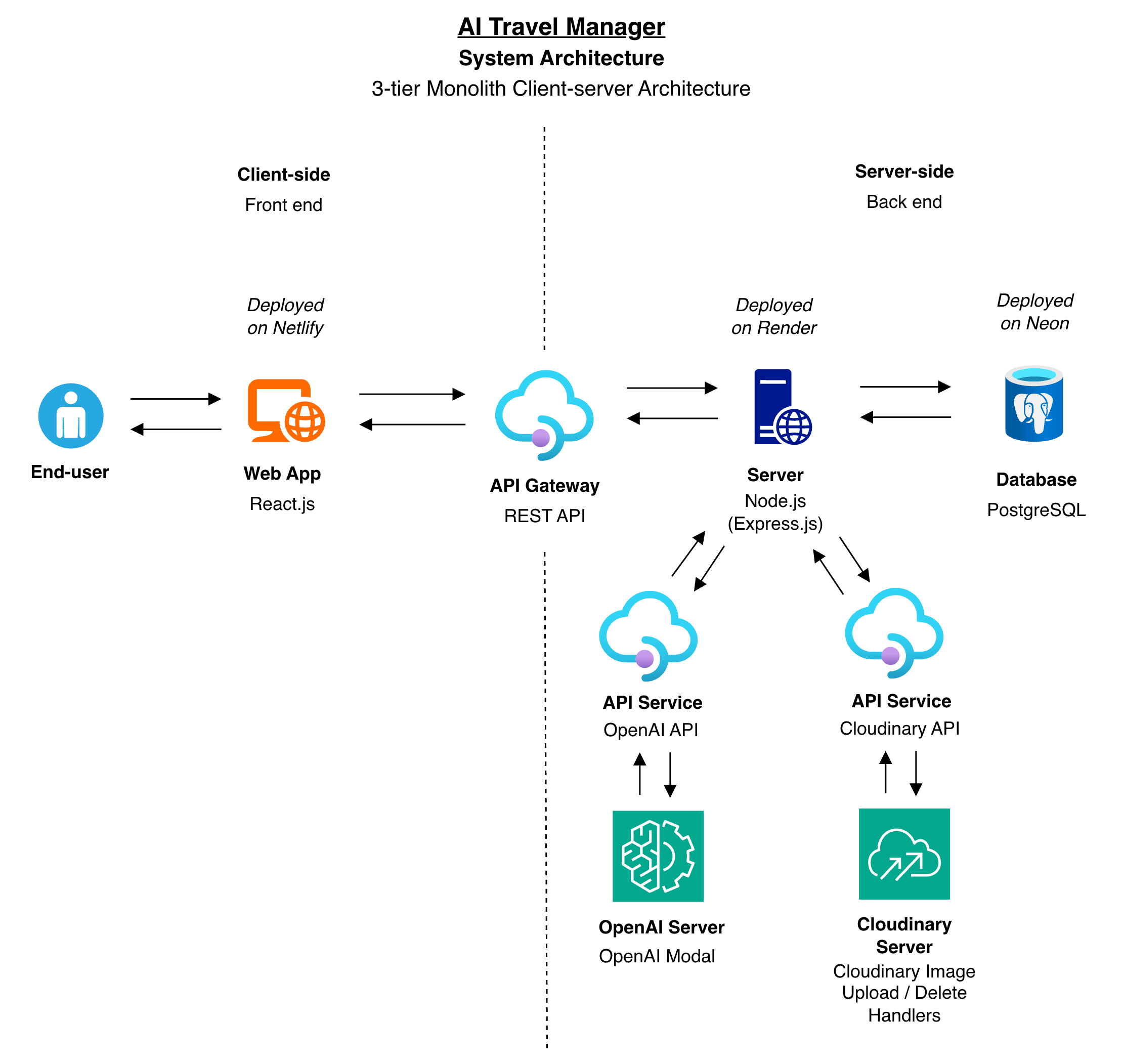
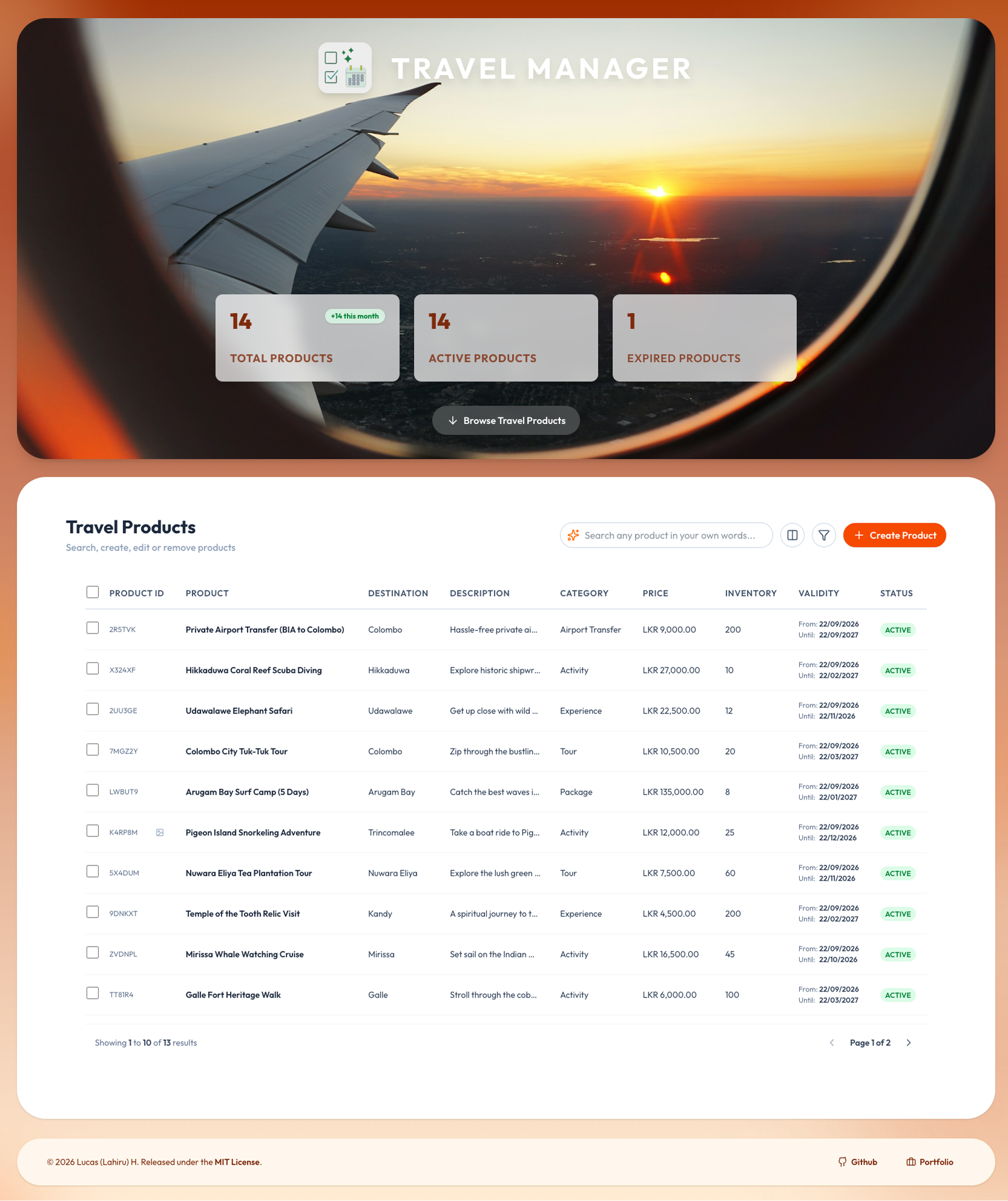
Figure 0.1: Main User Interface
https://lucaslhh-travel-manager.netlify.app


1. Description
An client/server application based on a Node.js + Express API paired with a React + Vite UI for a Travel Product management application. With full functionality across creating, editing, viewing, and deleting travel products, plus AI features for intelligent search and generating new product listings.
- Travel Product Management - Create, view, update, and delete travel products (destinations, categories, prices, validity dates).
- AI Search - Search for travel products using natural language powered by AI.
- AI Product Generation - Automatically generate details for new travel products based on minimal inputs with OpenAI.
- AI Image Generation - Generate product images with OpenAI.
- Image Management - Upload and delete images to and from Cloudinary.
- Data Export - Export a collection of products to Excel or PDF with a card layout, or export a single product to PDF in a full page view layout.
- Dashboard Stats - View statistics of all travel products.
- Responsive UI - Mobile responsive UI for seamless usage across devices.
2. Application Walkthroughs
Create Product
Figure 2.1: Create Product
Export Product Details to PDF from View Product Modal
Figure 2.2: Export Product Details to PDF from View Product Modal
Edit Product Details from View Product Modal
Figure 2.3: Edit Product Details from View Product Modal
Delete Product from View Product Modal
Figure 2.4: Delete Product from View Product Modal
Search Product with AI
Figure 2.5: Search Product with AI
Export Filter Results to Excel
Figure 2.6: Export Filter Results to Excel
Export Filter Results to PDF
Figure 2.7: Export Filter Results to PDF
Edit Product Details from Product Table
Figure 2.8: Edit Product Details from Product Table
Delete Product from Product Table
Figure 2.9: Delete Product from Product Table
Product Expiration
Figure 2.10: Product Expiration
3. System Architecture
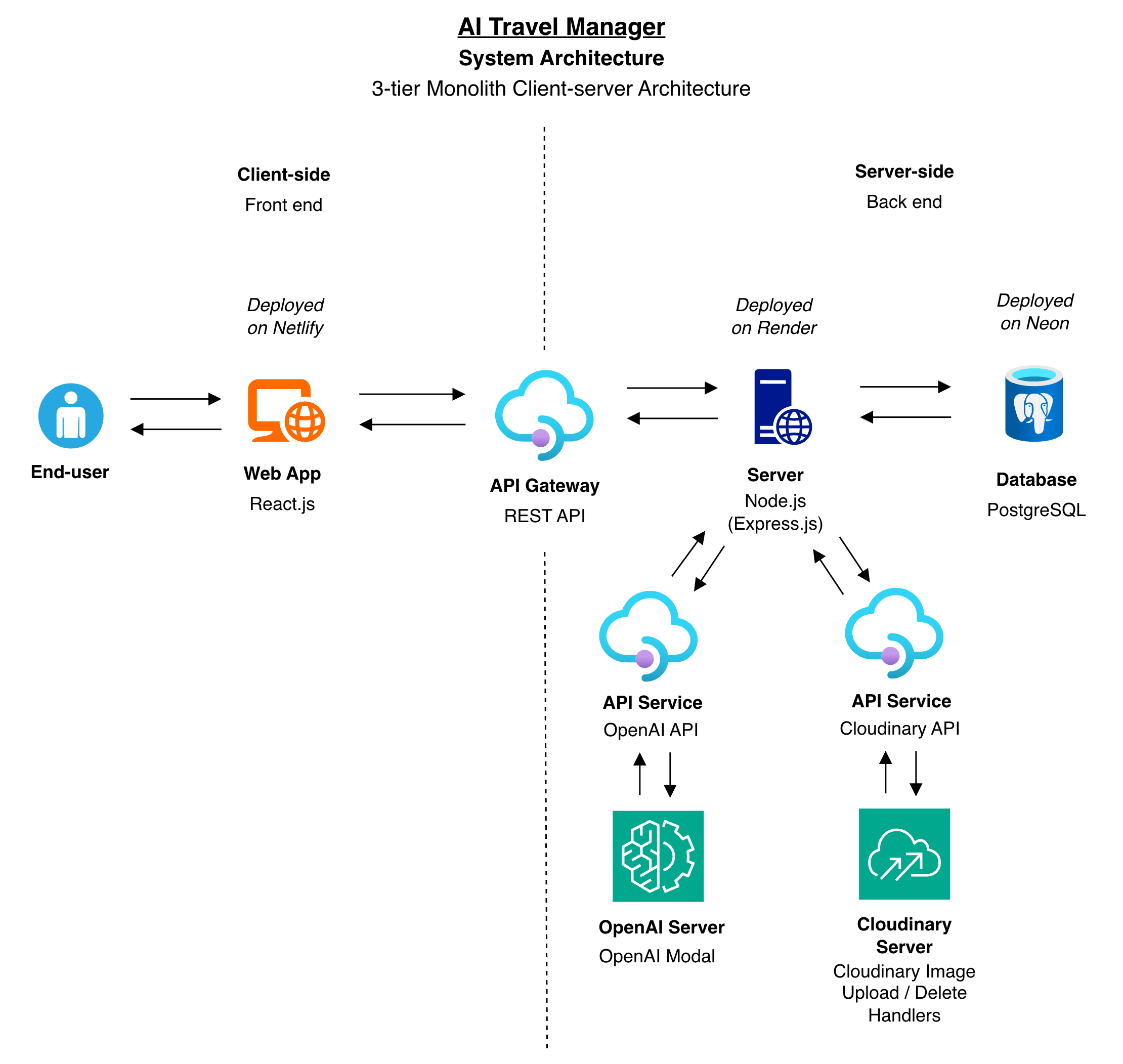
Figure 3.1: System Architecture Diagram
- Frontend: React (Vite), Tailwind CSS v4, TanStack Query (React Query), TanStack Table (React Table),
react-hook-form,lucide-react - Backend: Node.js, Express, Prisma ORM,
express-rate-limit,zodschema validation, and OpenAI API integration - Database: PostgreSQL
- Media Storage: Cloudinary
4. Installation
Requires Node 20+.
git clone <repo>
cd AI_travel_manager-web_app
Install dependencies for both the client and server:
cd Workspace/server
npm install
cd ../client
npm install
Copy the env examples and fill in real values:
# In Workspace/server
cp .env.example .env
Start the PostgreSQL database and API server (via Docker Compose):
cd Workspace/server
docker-compose up -d
(To stop them, docker-compose down)
Push the database schema to the running database (this will also run the seed script automatically to populate sample travel products):
npx prisma db push
(If you ever need to run the seed script manually, you can use npx prisma db seed)
(Alternatively, to run only the database in Docker and the server locally, you can use docker-compose up db -d and npm run dev in the server directory).
Run the Client Web App:
cd Workspace/client
npm run dev    # http://localhost:5173
5. Usage
5.1. Non-functional Features
- AI Integration -
- Leverages OpenAI for product search, generative product creation, and image generation.
- Security -
- Rate limit protection for all API endpoints using
express-rate-limit.
- Rate limit protection for all API endpoints using
- Input Validation -
- Frontend input forms are validated with
react-hook-formand backend requests withzod.
- Frontend input forms are validated with
- Backend Accessibility -
- The API is locked to one origin point by CORS, which is set to the frontend base URL.
- Performance & Data Grid -
- Frontend data fetching and caching is optimised using TanStack Query (React Query).
- Complex data tables are handled using TanStack Table (React Table).
- UI Responsiveness -
- The UI components and Tailwind layouts seamlessly handle various screen sizes.
5.2. Functional Features
- Manage Travel Products -
- Add new travel products by providing details like destination, category, price, and validity.
- View a list of all products in a structured table.
- Update or delete existing products.
- AI Search -
- Use natural language to search and filter products based on AI understanding rather than strict keyword matching.
- AI Product & Image Generator -
- Generate complete product descriptions and details using AI prompts with OpenAI.
- Generate product images using OpenAI.
- Image Management -
- Upload and delete images to and from Cloudinary.
- Data Export -
- Export a collection of products to Excel or PDF with a card layout.
- Export a single product to PDF in a full page view layout.
- Dashboard Statistics -
- Get an overview of the number of products in the inventory.
6. Source Code Structure
6.1. Frontend (Client) Source Code
The src directory contains the core frontend application code, structured as follows:
main.tsx: The main entry point of the React application that rendersApp.tsxinto the DOM.App.tsx: The main React component acting as the root of the application.global.css: The global CSS file where Tailwind CSS directives and custom global styles are defined.components/: Contains reusable React UI components.services/: Contains API service functions for communicating with the backend server.types/: Contains TypeScript type definitions.constants.ts: Contains constant values used throughout the frontend application.
6.2. Backend (Server) Source Code
The src directory contains the core application logic, structured as follows:
index.ts: The main entry point of the server that initializes the Express application and routes.config/: Contains configuration files (e.g. OpenAI and DB setup).schema/: Contains Zod validation schemas.middleware/: Contains Express middlewares (rate limiting, CORS, validation).routes/: Contains Express route definitions.controllers/: Contains route handler functions processing business logic and AI integration.data/: Contains database interaction functions wrapping Prisma calls.prisma/: Contains theschema.prismafile defining the database models.
7. License -
Copyright (c) 2026 H.V.L.Hasanka
Licensed under MIT License