E-Commerce Merchant Side Web App
A 3-tier e-commerce inventory management app — NestJS + Prisma + PostgreSQL API paired with a Next.js dashboard for product management, analytics, and full CRUD with authentication.
La documentation de ce projet n'est disponible qu'en anglais.
- TypeScript
- Next.js
- Tailwind CSS
- NestJS
- Prisma
- PostgreSQL
https://dealport.netlify.app


1. Description
An 3-tier monolith application based on a NestJS + Prisma + PostgreSQL API paired with a Next.js UI for DEALPORT, an e-commerce application for inventory management. With full functionality across the Dashboard, Add Product and Product List screens that's behind an authentication guard.
- Dashboard - View a glimpse of product sales stats and transaction history.
- Add Product - Add new product to the shop's inventory.
- Product List - View / Edit / Delete products from the shop's inventory.
2. System Architecture
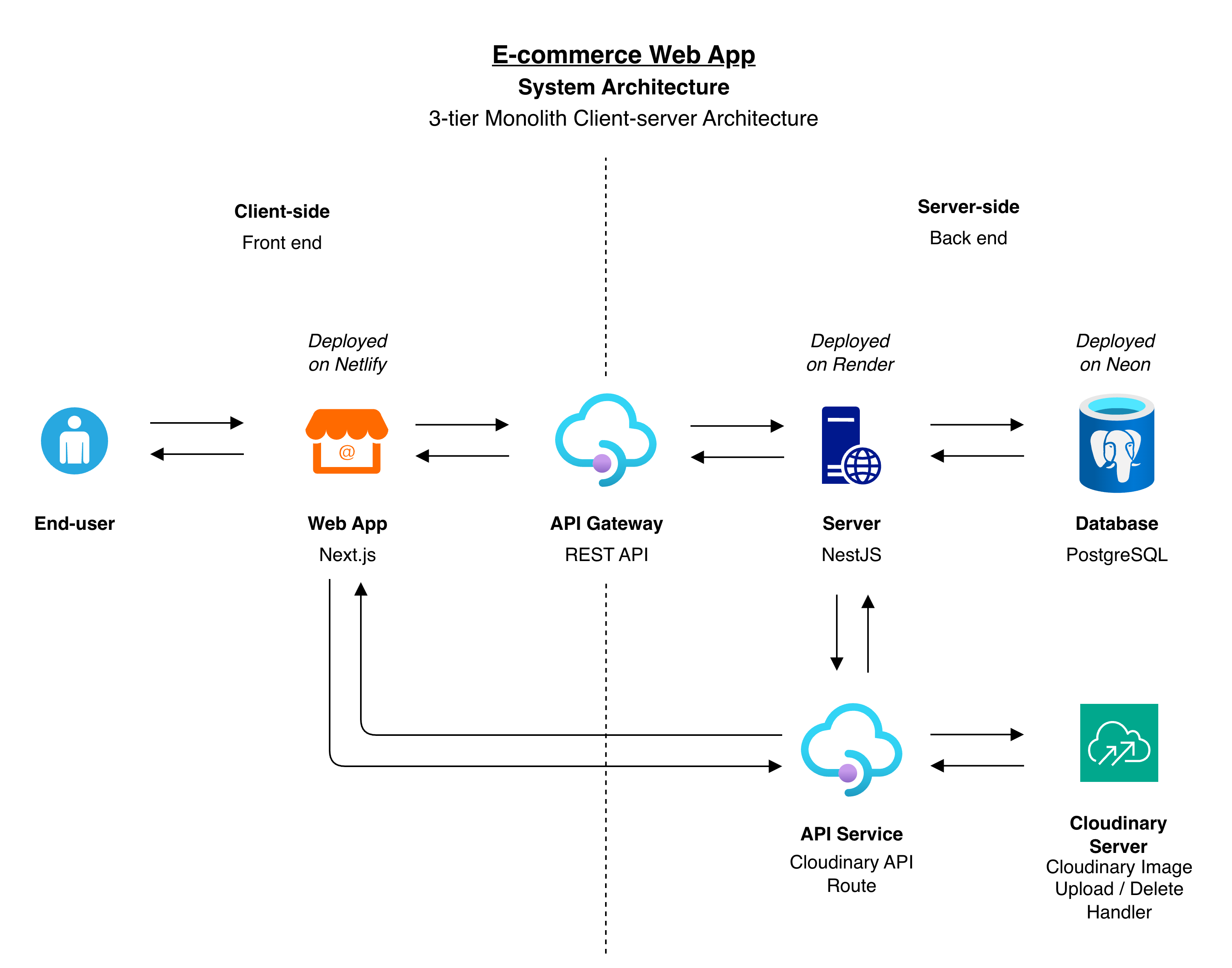
Figure 2.1: System Architecture Diagram
- Frontend: Next.js (App Router), Tailwind, react-hook-form + zod. Deployed on Netlify.
- Backend: NestJS, Prisma ORM, JWT auth via httpOnly cookie,
@nestjs/throttlerrate limiting on/auth/login. Deployed on Render as a Docker container. - Database: PostgreSQL 16, hosted on Neon.
- Images: Cloudinary, the
secure_urlis stored in Postgres.
3. Installation
Requires Node 22+, npm, and either a local PostgreSQL instance or Docker.
git clone <repo>
cd e-commerce_web-app_infrastructure
npm install
Copy the env examples and fill in real values:
cp Workspace/e-commerce_api/.env.example Workspace/e-commerce_api/.env
cp Workspace/e-commerce_web-app/.env.example Workspace/e-commerce_web-app/.env.local
Start Postgres (Docker) and the API:
npm run docker:up
npm run db:migrate
npm run db:seed
Run Client App (from the repo root):
npm run dev:web # http://localhost:3000
4. Demo Account Credentials
Seeded by npm run db:seed (Workspace/e-commerce_api/prisma/seed.ts):
| Password | Note | |
|---|---|---|
lucas@test.com | $Lucas34 | Contains seed products |
sam@test.com | sAm@543 | |
john@test.com | @48joHn |
5. Usage
5.1. Non-functional Features
- Security -
- JWT token is sent via http cookies only
- Rate limit auth handler using,
@nestjs/throttler
- NestJS Default Reject Authorization -
- Except for the login and health check requests, all the endpoints require a valid session. The
@Public()allow login endpoint to accessed by anyone.
- Except for the login and health check requests, all the endpoints require a valid session. The
- Input Validation -
- Every property in the request body is validated by the data format and acceptance rules.
- Backend Accessability -
- The API is locked to one origin point by CORS, which is the frontend base URL.
- Sensitive Data Access -
- The password is stored in the database with a one-way hash function encryption.
- Image Upload Integrity -
- The images are uploaded directly from the frontend to Cloudinary using a signed upload URL. Which is generated from the Cloudinary's secret from the backend.
- UI Responsiveness -
- The UI components can handle several screen sizes from desktop to mobile.
5.2. Functional Features
- Authentication -
- Can login and logout into the application
- Can only access products created by the logged in user.
- Dashboard -
- View static sales stats
- View data integrated Transaction and Product records
- Add Product -
- Add new products by providing basic details, pricing, inventory, attaching an image, categories, tag and color
- Submit new product as a draft or publish statuses
- Warning shown when navigating to separate screen with populated add product form
- Product List -
- View list of draft and published products
- Filter products by status, name and item ID
- Select a product to edit it's details
- Select products to delete
Figure 5.2.1: Video Walkthrough
6. Potential Improvements
- Token Refresh -
- Currently the session is live until the token expires and the user is forcefully logged out.
- Adding a mechanism to generate a refresh token and use it refresh the original JWT token would eliminate the forceful logout.
- Handle Many Product Images -
- Currently only one image can we attached to a product. Add more images will be the merchant to show several angles of the product to the buyer.
- Server-side Processing For Dashboard -
- Currently the product list in the Dashboard UI is filtered and sorted from the client-side (frontend). This will apply an exhaustive load to the system when the product count increases.
- Similar to how the Product List UI is handled.
- Test Coverage-
- Adding, unit tests, integration tests and E2E tests will ensure future enhancements to the system won't break what was already working.
7. Notes
- How is image upload handled?
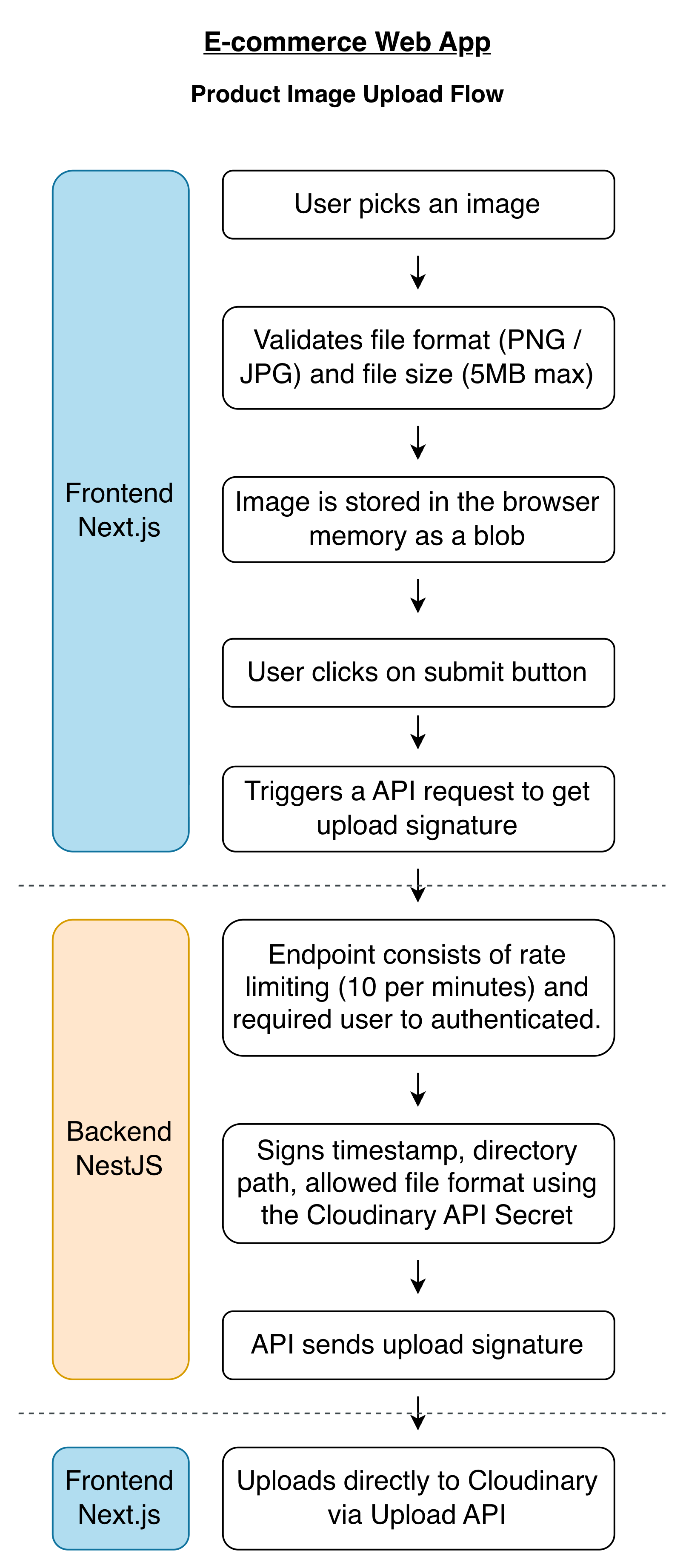
Figure 7.1: Product Image Upload Flow
- How is image delete handled?
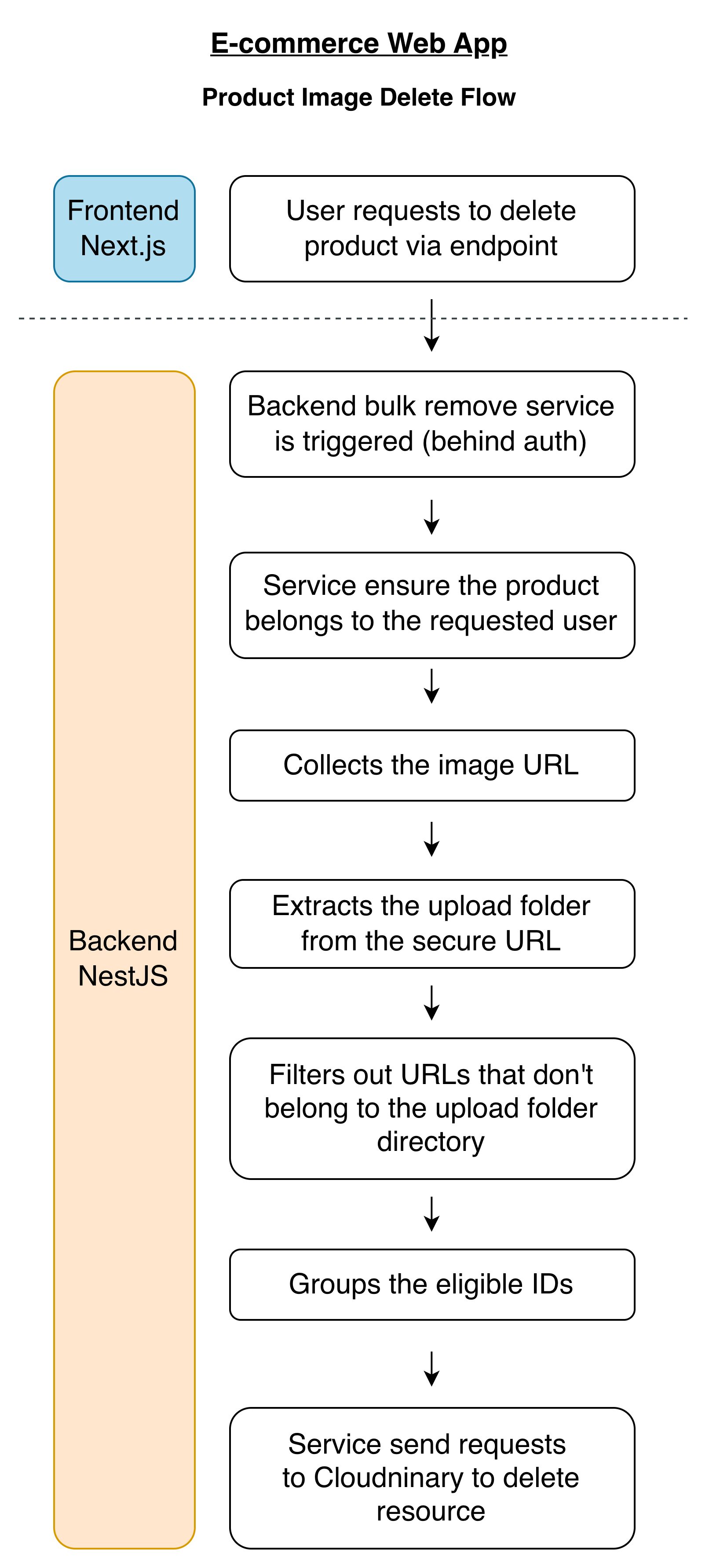
Figure 7.2: Product Image Delete Flow
-
Why not use Bearer Token?
- When a JWT is stored in the localStorage, it will be readable to any JavaScript on the page.
- A single XSS bug from anywhere, which it could be an product name, category or string, provides the attacker with the raw data.
- This could continue until the token has expired.
- FIX: If we use a httpOnly cookie, it will be invisible to the document.cookie or any JavaScript on the page.
- This doesn't eliminate the XSS threat, it only minimises the blast radius.
-
Cross-domain Auth-
- The frontend (NextJS) is hosted on Netlify and the backend (Nest.js) in Render.
- These two services use two different domains. So when a cookie is initialised by Render, it's invisible to Netlify (NextJS's next/headers,
getServerUser()). - The user will be bounced back to the login screen after a successful authentication.
- FIX: Make the browser to think there's only one service.
- So instead of stamping the cookie as Render origin, using netlify.toml, it tells Netlify, any request from /api/, pass it through to Render and return it as if came from me (Netlify).
- This way, the cookie origin is set as Netlify.
9. Credits
- The UI was built based on two Figma Community Designs -
10. License -
Copyright (c) 2026 H.V.L.Hasanka
Licensed under MIT License